XBB Dongle® & XBB PowerUnit®
Control your auxiliary lighting through the car’s diagnostic socket, without hunting for CAN bus wires or interfering with the electrical system. Installation takes a few minutes with your phone.
Read moreXBB Dongle® & XBB PowerUnit® in short
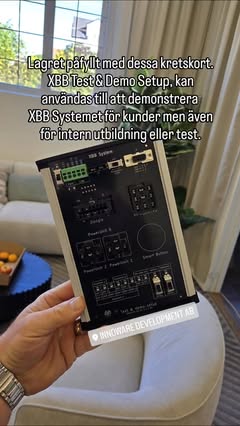
XBB Dongle® connects to the diagnostic socket of the car and reads the vehicle signals. XBB PowerUnit® receives them wirelessly and switches the power to the auxiliary lights. That is the whole system: two units, with no cabling between them.
Why it is needed
On many new cars, auxiliary lights can no longer be wired the traditional way, with a relay and control current from the original high beam. Vehicles with advanced headlight systems are controlled digitally, so their signals have to be read instead.
How XBB differs from other solutions
An ordinary CAN bus interface is wired into the internal network of the car. XBB is not. The Dongle picks up the information through the diagnostic socket instead, the same socket the workshop uses for servicing. Nothing is connected to the original wiring, nothing needs to be cut, and the installation leaves no trace in the electrical system.
What the PowerUnit handles
Every XBB PowerUnit® has two individually controlled outputs. Output 1 handles up to 15 amps, output 2 up to 5 amps, and if you need more power the outputs can be joined. They can follow one signal each or the same one. Up to four PowerUnits can be connected to a single Dongle, wirelessly over Bluetooth 5. No cable is needed between the units.
More than auxiliary lights
Which signals you can reach depends on the car model as well as the recipe you choose. Besides the high beam, the system often gives access to daytime running lights, reversing lights and further functions. What exists for your own car is shown in the app plus under Compatible car models.
How the installation works
The Dongle is plugged into the diagnostic socket, you pick a recipe in the XBB Configurator app and connect the lights. It takes a few minutes and is done from your phone, on both Android and iOS. Step by step instructions are in our installation guide.
About the diagnostic socket
The diagnostic socket (OBD2) is a standardised connector that EU legislation requires on modern cars sold in Europe. Through it, vehicle information is made available for servicing, fault tracing and third party solutions such as XBB.
The user manual, safety information and the information required by REACH Article 33 for XBB Dongle® and XBB PowerUnit® are on the page Declaration of Conformity.
XBB and compatible car models
Thinking about using XBB products? Have a look through our compatible car models to see whether we have a recipe that fits your car.
Want to know more, or do you have a question? Have a look in our FAQ to see whether it is already answered there.